If you can’t find a USB drive when installing an app, first check that it’s plugged into adata port. Being able to charge your phone only confirms that the port supplies power. Type-A and Type-C describe the connector shape, so you can’t tell from that alone whether it supports data.
This post crops the original images from each model’s owner’s manual, keeping the port numbers so you can use them to find the ports while parked. Information checked against 2026-10-07; each image lists the market, model/model year, manual version and page number. Trim, region and model-year differences may apply even to cars with the same name. The descriptions below reflect the corresponding manuals and aren’t a guarantee that every car is equipped the same way. For installation steps, see the companion post:比亚迪车机安装 App:应用市场、U 盘与 ADB 怎么选.
Four spots that are easy to mix up
- Han DM-i Zhiji Edition: The data port is inside the center armrest storage compartment, not the fast-charging port on the outer side of the front row.
- Dolphin: The same 2025 model-year manual covers two configurations, with the data port numbered ① in one and ② in the other. A Type-C port may also be a data port.
- Yuan UP, Qin L/Qin PLUS, and others: Look in the open storage area below the center console first; don’t just check the upper phone-charging area.
- Sealion 07 and export-market SEALION 7: The port functions differ between the domestic-market Zhiji Edition and the Australian 2025 manual, so you can’t identify them by vehicle name alone.
The original images are listed below by model. Numbers ① and ② refer to thecorresponding image, and there’s no rule that “the one on the left is always the data port” across all models.
Yuan PLUS and Yuan UP
Third-generation Yuan PLUS
Location:In the open area below the center console, on the driver’s side.
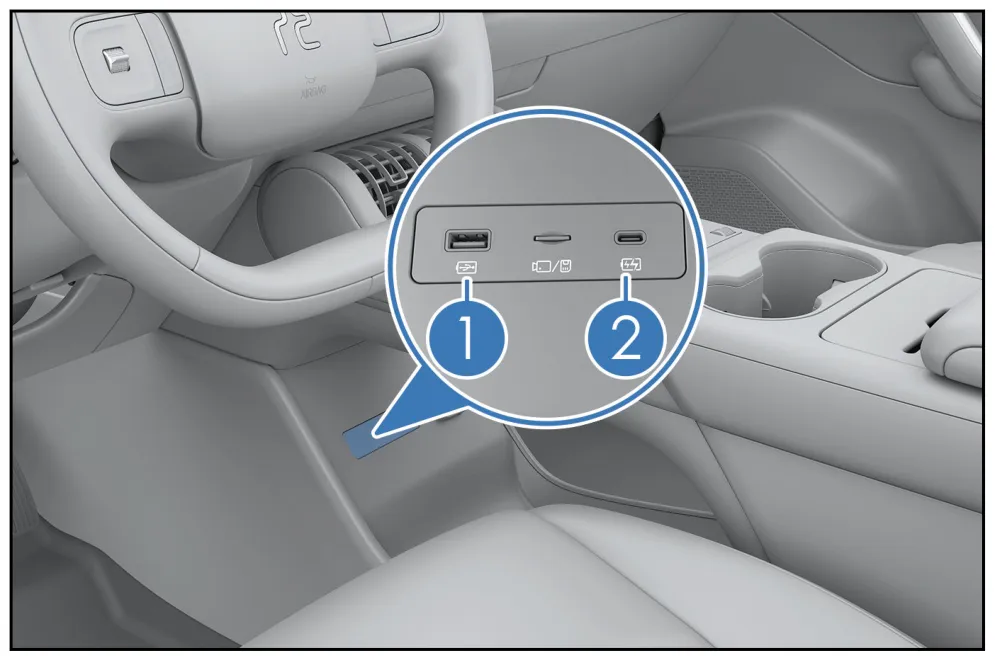
Reading the image:① USB data; ② USB charging. Follow the numbering and port functions shown in this image and manual.
Image 1:BYD 官方用户手册, printed page 313.
Yuan UP Zhiji Edition
Location:In the open area below the center console.
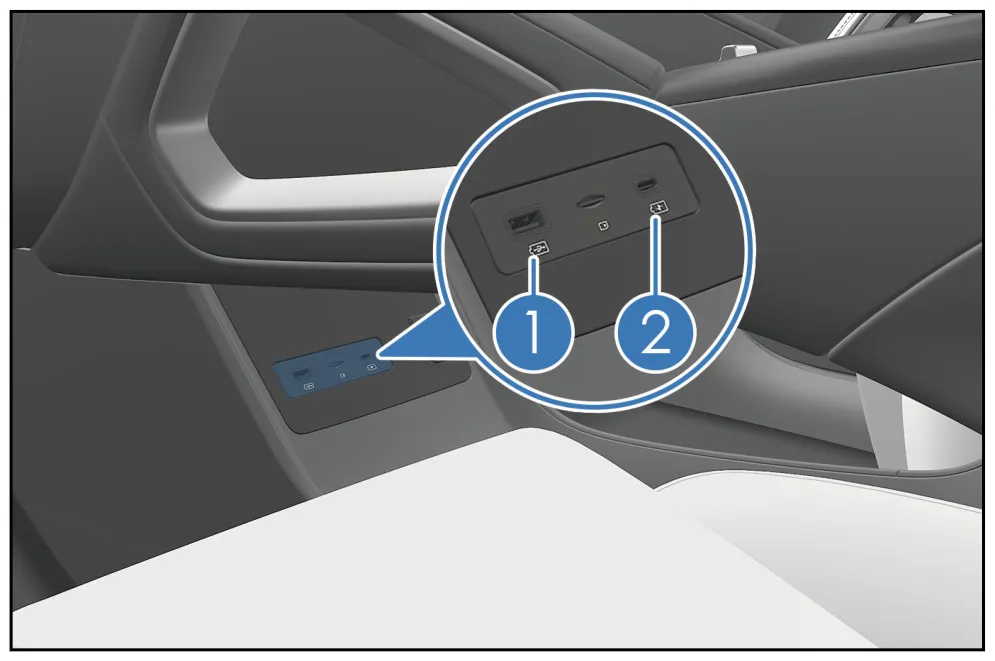
Reading the image:① USB data; ② Type-C charging only.
Image 2:BYD 官方用户手册, printed page 299.
Ocean models: Seagull and Seal
2026 model-year Seagull
Location:In the open area below the dashboard.
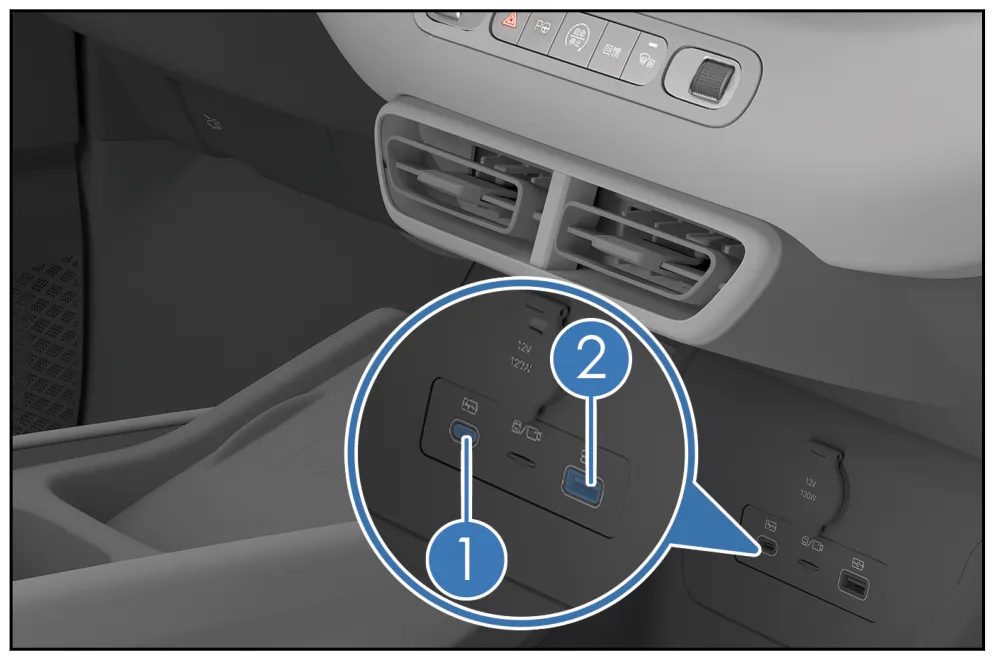
Reading the image:② USB data; ① is labeled only “Type-C port”—the page doesn’t confirm that it supports data.
Image 3:BYD 官方用户手册, printed page 302.
2025 model-year Seagull
Location:Front row; use the image to locate the ports.
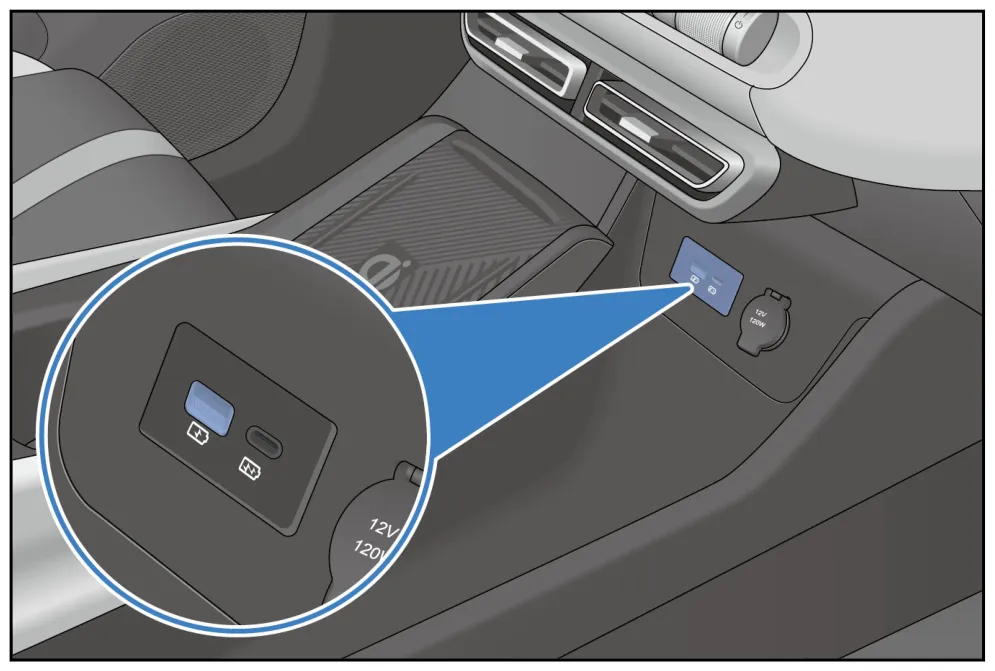
Reading the image:This manual labels them only as “front-row charging ports” and doesn’t number a data port. You can’t confirm data support from this, or assume the layout is the same as on the 2026 model year.
Image 4:BYD 官方用户手册, printed page 177 (page 176 in the PDF reader). The download is a ZIP file; extract it and open the PDF with the same name.
Seal (260622 edition manual)
Location:In the open area below the center console, on the driver’s side.
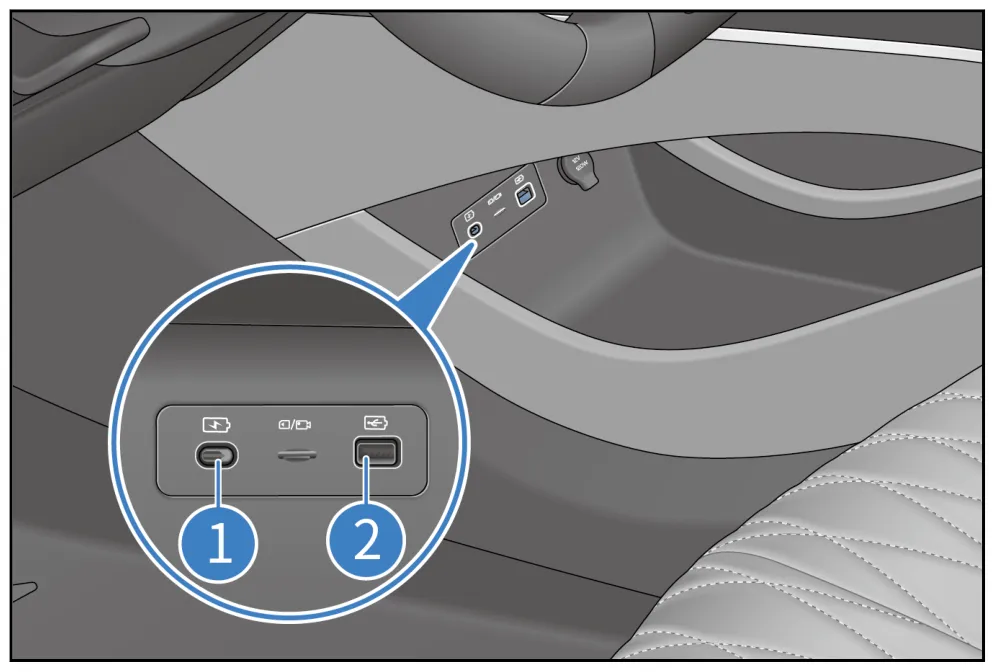
Reading the image:① Type-C fast charging; ② USB data.
Image 5:BYD 官方用户手册, printed page 217.
Port diagrams for Qin, Song, Tang and Han
2026 model-year Qin L DM-i
Location:In the open area below the center console.
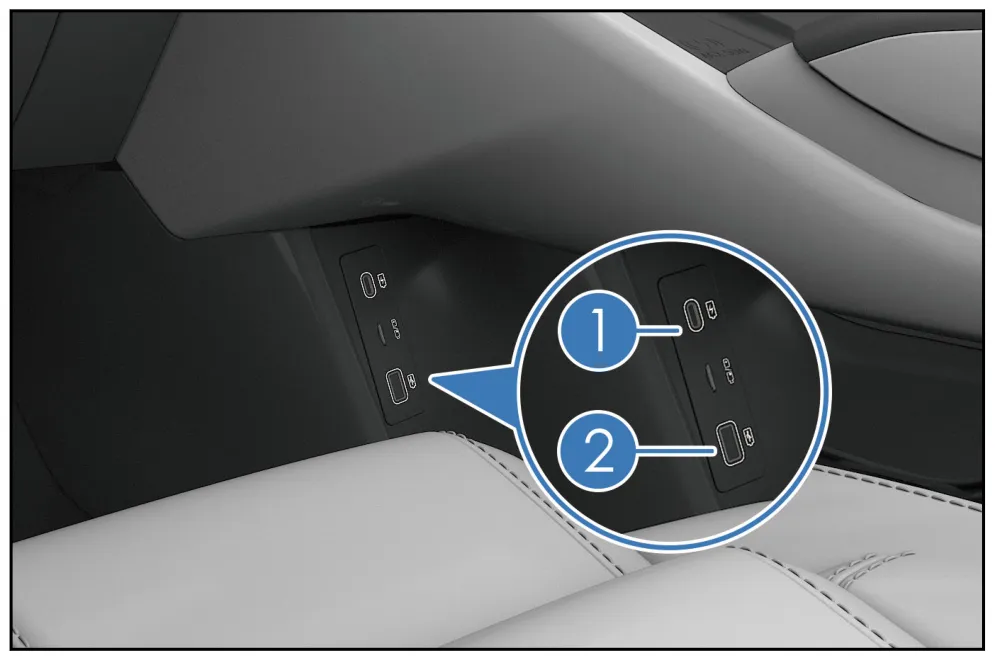
Reading the image:① Type-C 60W, charging only; ② USB data.
Image 6:BYD 官方用户手册, printed page 349.
2026 model-year Qin PLUS DM-i
Location:In the open area below the center console.
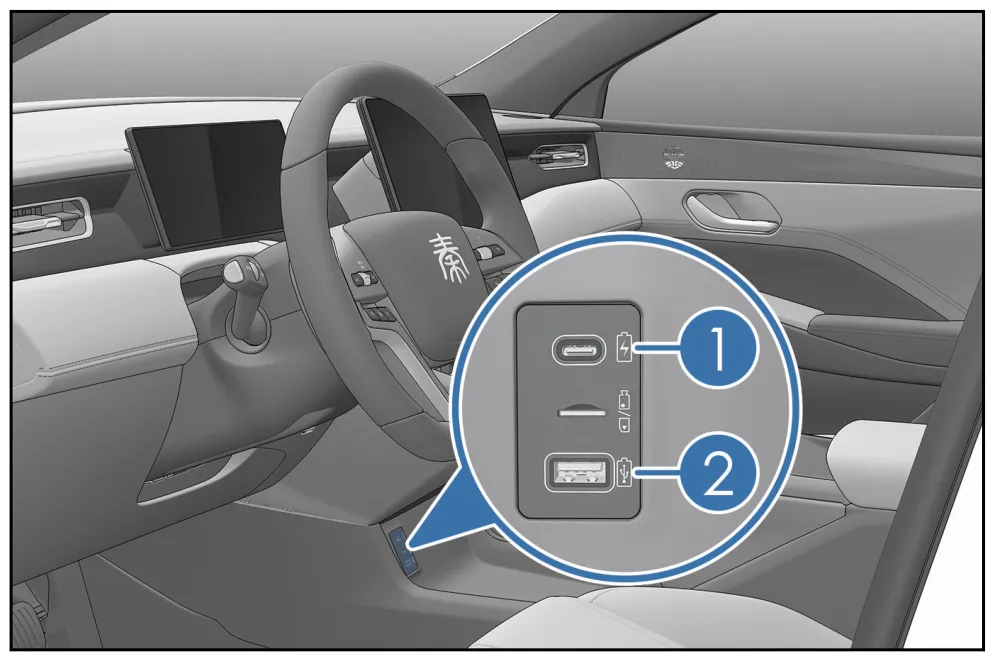
Reading the image:① Type-C fast charging; ② Type-A data.
Image 7:BYD 官方用户手册, printed page 341.
Song Pro DM-i Champion Edition/Honor Edition
Location:In the open area below the front-row center console.
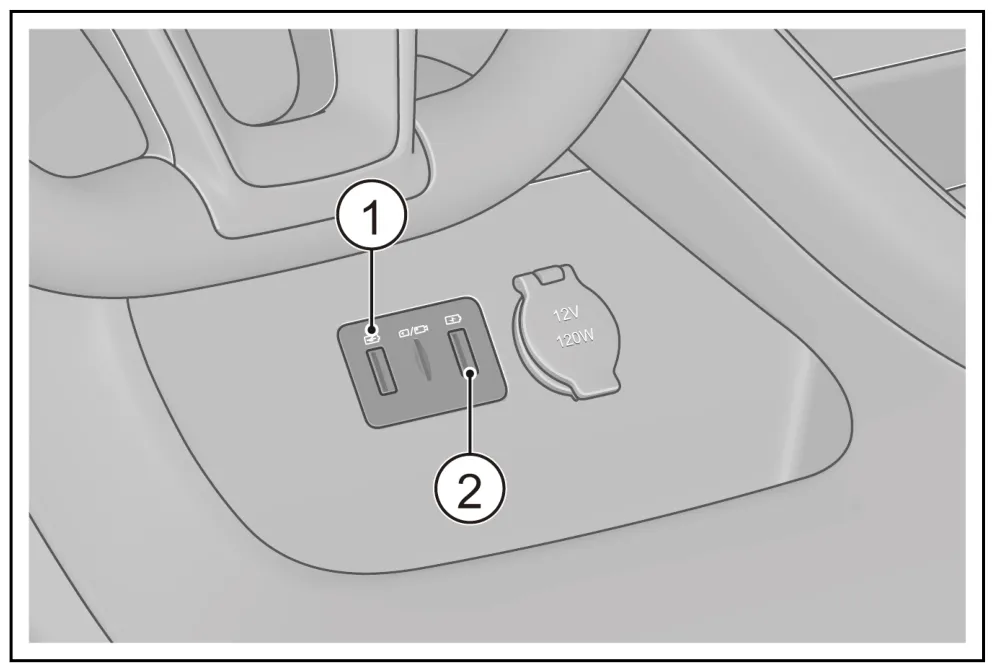
Reading the image:① USB data; ② USB charging. Both are Type-A in the image; the rear ports are charging only.
Image 8:BYD 官方用户手册, printed page 239.
2025 Song PLUS EV
Location:In the open compartment beneath the front center console.
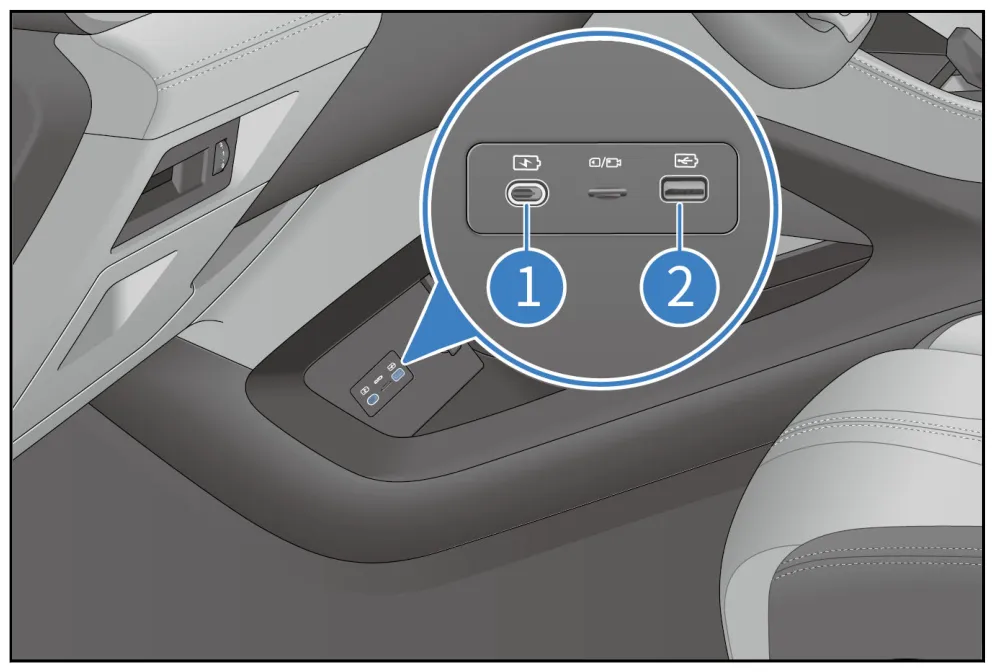
How to read the diagram:① USB charging (shown as Type-C); ② USB data (shown as Type-A); the rear ports are for charging only.
Figure 9:BYD 官方用户手册, printed page 243.
2026 Song L DM-i
Location:In the open compartment beneath the center console, on the driver's side.
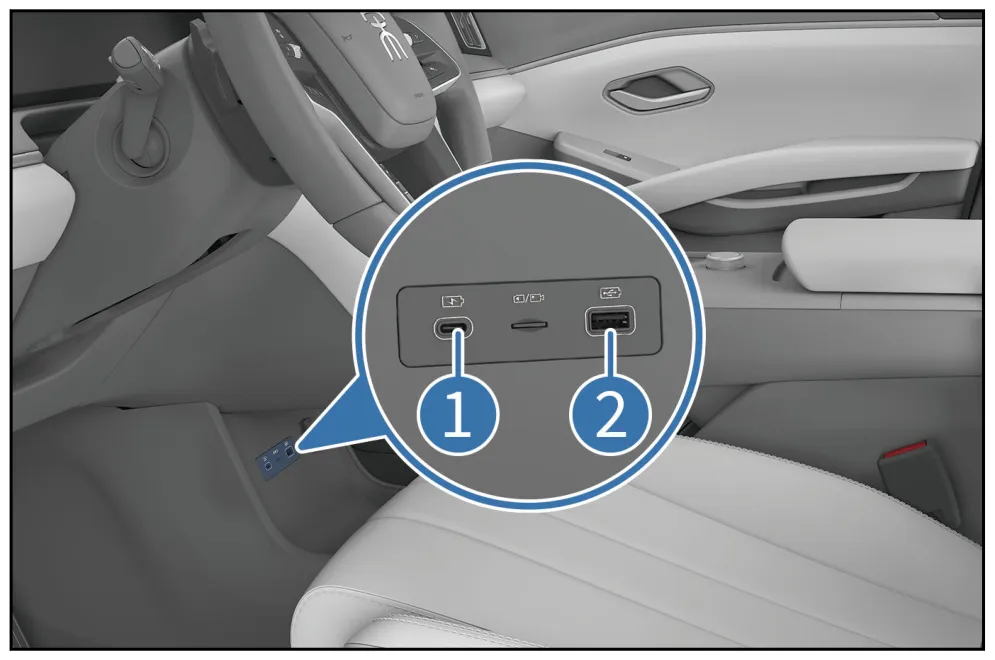
How to read the diagram:① Type-C fast charging; ② USB data.
Figure 10:BYD 官方用户手册, printed page 326.
Tang DM-i Intelligent Driving Edition
Location:Below the front center air vents.
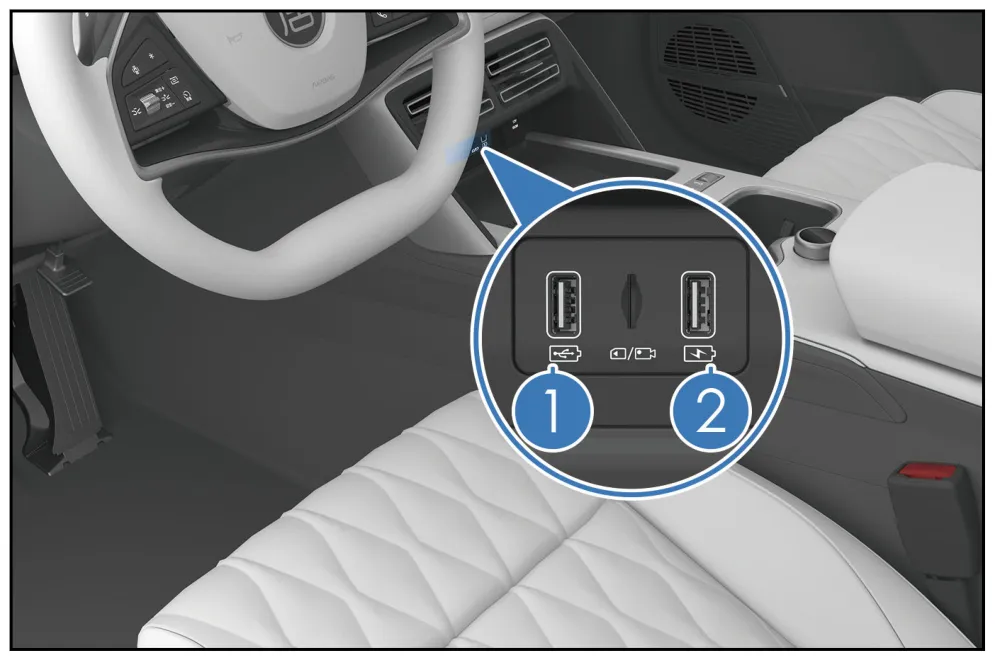
How to read the diagram:① Type-A data; ② Type-A charging. The rear Type-A/Type-C ports are labeled charging/fast charging.
Figure 11:BYD 官方用户手册, printed page 358.
Han DM-i Intelligent Driving Edition
Location:Inside the center armrest storage compartment; open the lid to find it.
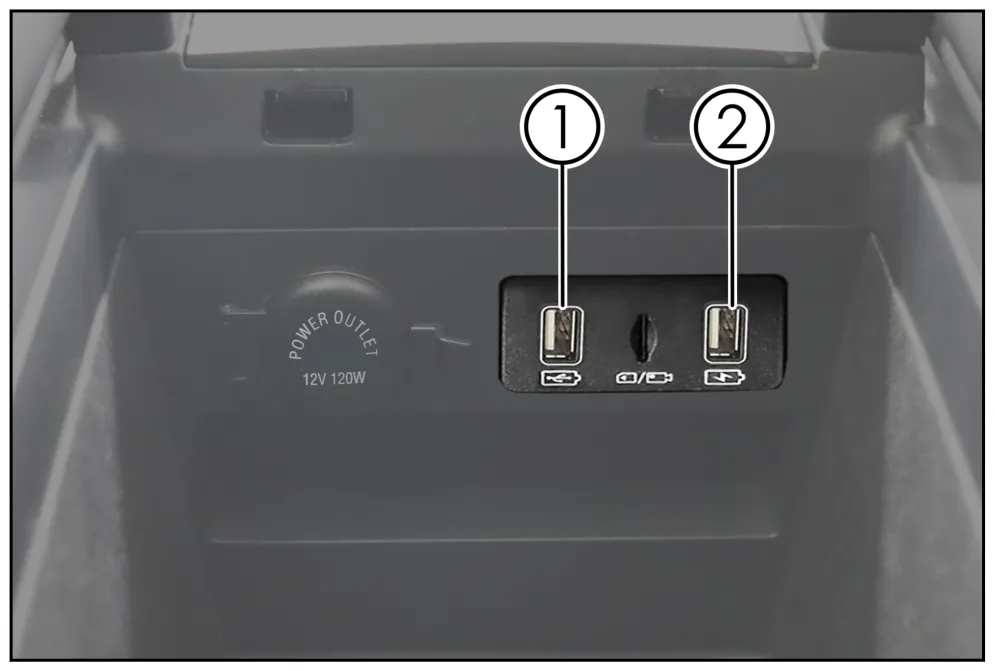
How to read the diagram:① USB data; ② USB charging, both shown as Type-A. Don't mistake the visible fast-charging port on the front outer side or the rear armrest port for this data port.
Figure 12:BYD 官方用户手册, printed page 332.
Sealion 07 and Dolphin
Domestic-market Sealion 07 EV Intelligent Driving Edition
Location:In the open compartment beneath the center console, on the driver's side.
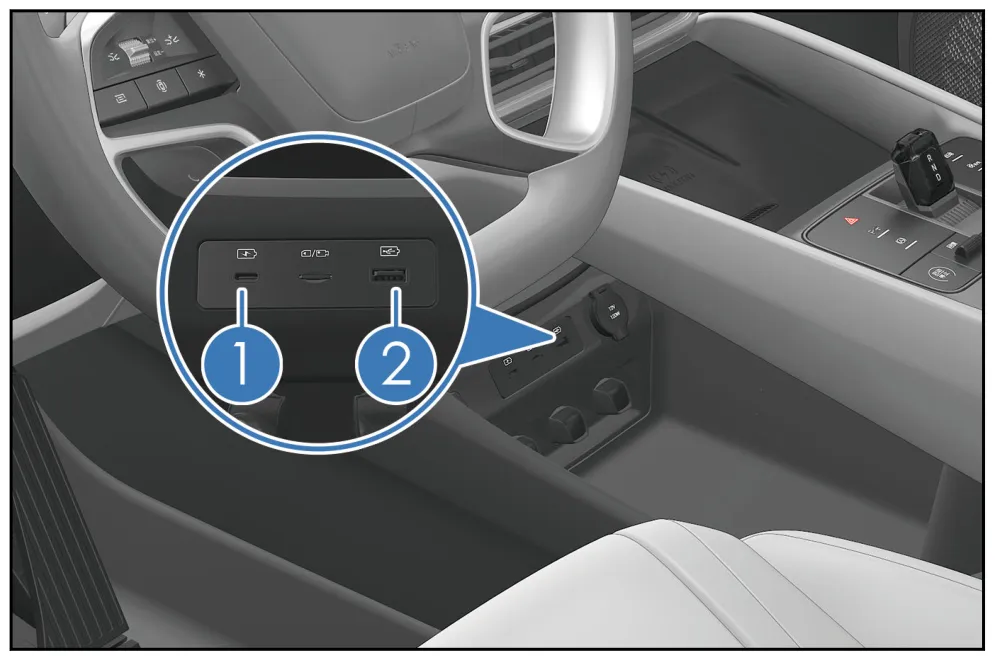
How to read the diagram:① USB charging (shown as Type-C); ② USB data (shown as Type-A).
Figure 13:BYD 官方用户手册, printed page 325.
2025 Dolphin · Configuration 1
Location:Front USB panel; check the configuration diagram to identify the ports.
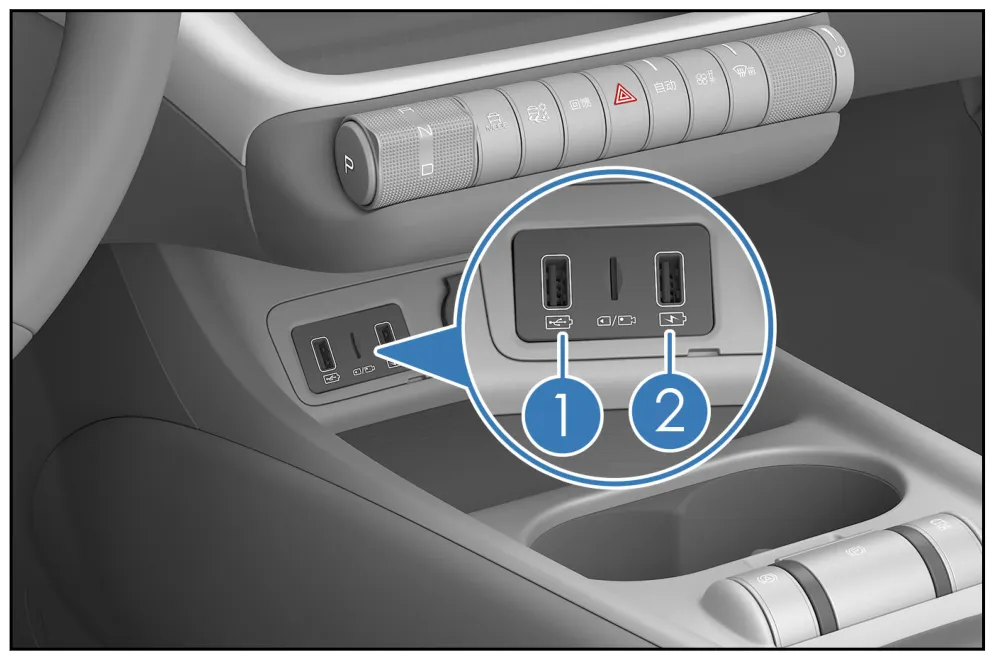
How to read the diagram:① USB data; ② USB charging, both shown as Type-A.
Figure 14:BYD 官方用户手册, printed page 212. Download the ZIP file and extract it to view the PDF with the same name.
2025 Dolphin · Configuration 2
Location:Front USB panel; check the configuration diagram to identify the ports.
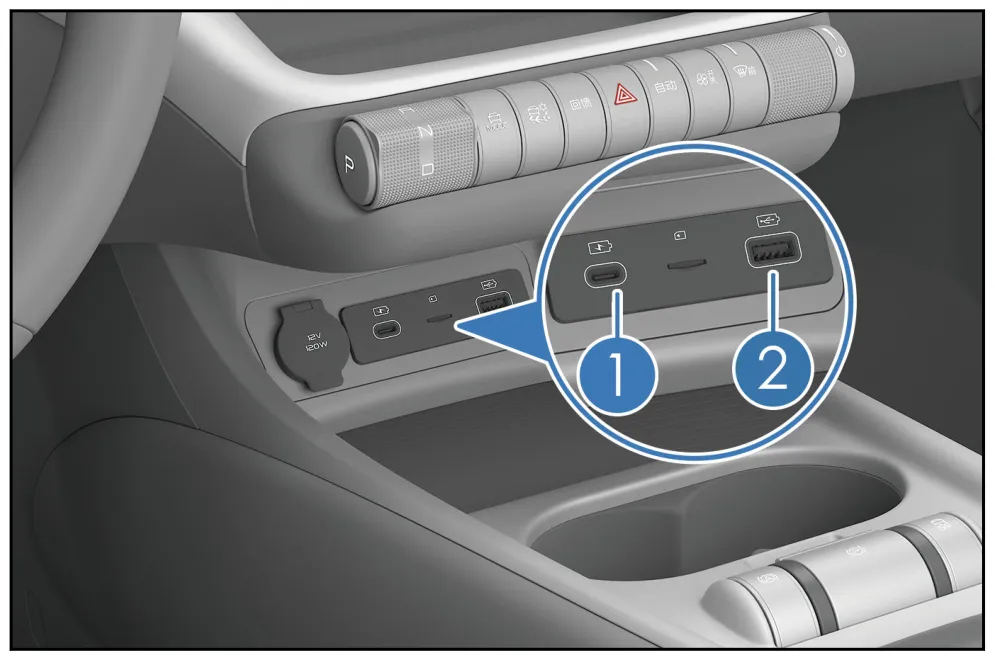
How to read the diagram:① USB charging; ② USB data, both shown as Type-C. The data-port numbering is reversed between Configurations 1 and 2.
Figure 15:BYD 官方用户手册, printed page 212. Download the ZIP file and extract it to view the PDF with the same name.
Export models: ATTO 3, DOLPHIN, SEALION 7
ATTO 3 · European 2024 right-hand-drive version
Location:Lower level of the center console.
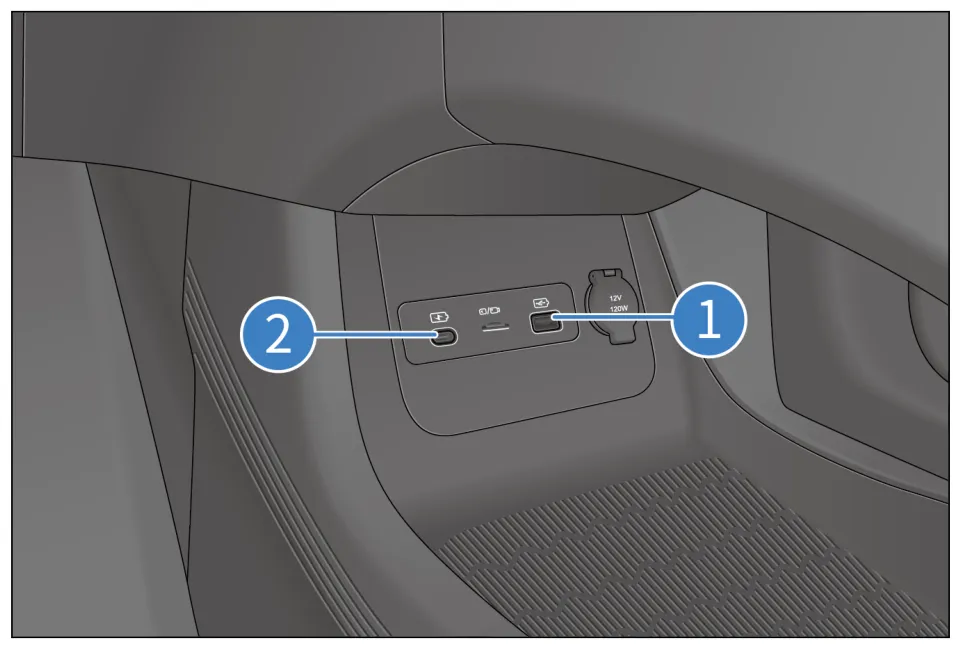
How to read the diagram:① Type-A data; ② Type-C charging only. The function descriptions are on printed page 162, and the diagram is on 163; don't transpose the left-right orientation from the right-hand-drive illustration.
Figure 16:BYD 官方用户手册, printed page 163 (page 164 in the PDF reader).
DOLPHIN · Irish right-hand-drive version, 2023-12 English manual
Location:Front USB panel.
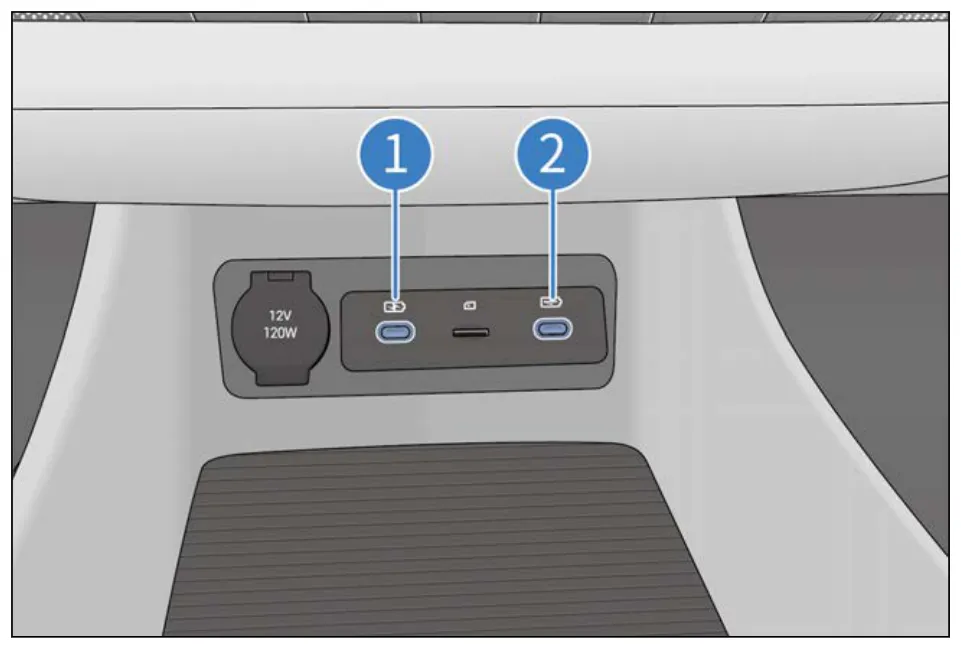
How to read the diagram:① USB charging; ② USB data; both ports are shown as Type-C. This does not mean “all Type-C ports are charging-only.”
Figure 17:BYD 官方用户手册, printed page 149 (page 150 in the PDF reader).
SEALION 7 · Australian 2025 version
Location:Below the center console.
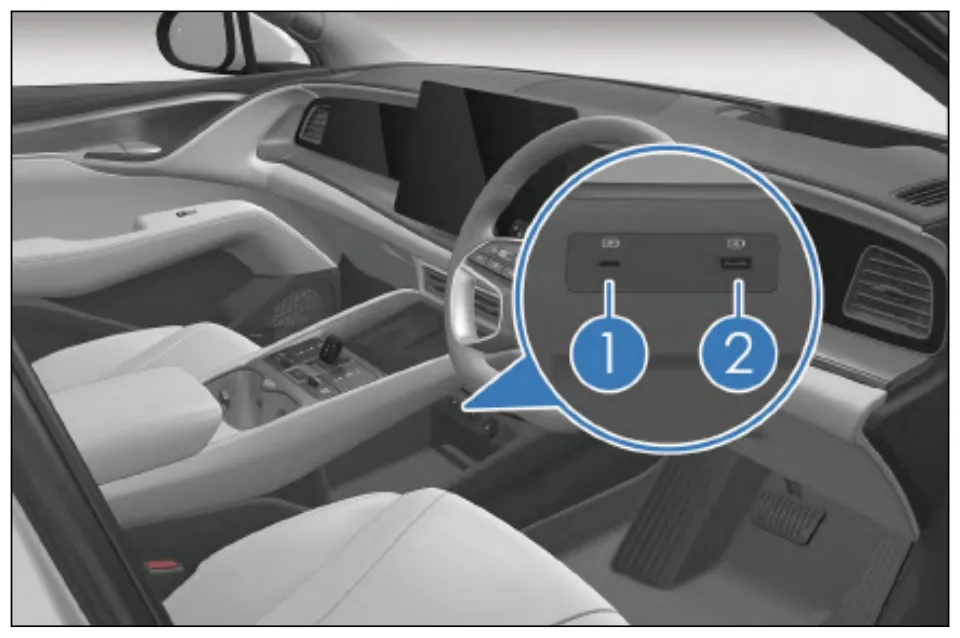
Reading the diagram:The manual identifies both ① Type-C and ② Type-A as data ports. Don’t apply the domestic SEALION 07 conclusion that “① is for charging and ② is for data”; having data functionality also doesn’t necessarily mean it can connect to a computer for ADB.
Figure 18:BYD 官方用户手册, printed page 165.
Once you’ve found the port, troubleshoot based on where it fails
- Park the car and make sure the head unit is operating normally. Some manuals require the vehicle to be in ON/OK mode for the port to work. Check the “In-vehicle equipment / Other equipment / USB port” section of the manual for your specific model year.
- First check whether the file manager can recognize the USB drive. If it can’t see it, first check the port, USB drive and adapter. If it can see the files but won’t install them, refer to the companion installation post and check system permissions, firmware or regional approval. Troubleshoot these as two separate issues.
- Choose the format based on the relevant manual and specific installation guide. The manuals for the 2025 Dolphin and European ATTO 3 recommend FAT32, with a capacity of no more than 128GB; the manual for the Tang DM-i Intelligent Driving Edition recommends NTFS, 8–128GB. There is no one-size-fits-all conclusion that all head units here require FAT32. Formatting erases the files, so back up your data first. And just because the head unit can read a format doesn’t mean an older directory-scanning installer will accept it.海豚手册,211 页,唐手册,358 页.
- For computer ADB, check the debugging switch and authorization separately. When a USB drive is connected, the head unit acts as a USB host and reads files. Connecting to a computer for debugging also requires the head unit to have the relevant debugging feature enabled. A manual’s mention of a “data port” does not, by itself, prove that the firmware supports USB ADB. The USB cable and adapter must support data transfer;
adb devices the blank screen and unauthorized states also need to be handled differently.Android 官方 ADB 文档.
If your port doesn’t match the diagram, don’t guess which port number it is. Check BYD 国内用户手册入口, and for export vehicles, consult the official manual for your market. This post only includes versions whose diagrams and functions have been verified. For other model years, Han EV/Tang EV, Song L EV, Destroyer 05, Seal 06, e2, Denza, Fangchengbao and others, we haven’t added diagrams based on a similar-looking appearance.
How to use the videos alongside this post
- For installing via the domestic file manager, see 布丁 UI 的 B 站教程, 2023-09-04; it’s for the corresponding older interface, so check your firmware first.
- For the older USB scanning method on export ATTO 3, see Xinger's Tech Lounge 的 YouTube 教程, 2023-07-14. The author has added information about it no longer working after 13.1.32.2310…, so it shouldn’t be taken as a guarantee that it will work on newer versions.
The two videos are by different creators and cover different methods. We haven’t verified matching versions of the same content on Bilibili and YouTube. For more ADB diagrams, text and videos, see the companion installation post.
Feel free to add details:Sales market | Model/model year | Full head-unit firmware version | Photo of the port | Whether it can read a USB drive | Manual page number. Please cover the VIN, account details and any other personal information in photos. Describe USB recognition, successful installation and ADB connection separately so other owners can reproduce your results.
This article was compiled by a BYDTalk community editorial account based on public information. Image rights belong to the respective rights holders. This is not an official announcement or a real-vehicle test by the operations team.