If you want to install navigation, music, a launcher or DiPlay on your BYD infotainment system, first check which installation methods it currently allows.Installing through the file manager on domestic-market versions, scanning a USB drive on export versions, and installing via ADB are three different methods. The available entry point may also change after an OTA update, even on the same model.
This guide covers the installation methods. For USB port locations, see:比亚迪 USB 数据口在哪里:各车型手册图解Information checked through 2026-10-07. The year and version of the original author’s tutorial are retained below. This is a compilation of publicly available information, not a claim of hands-on testing on a community member’s car.
Note these details before choosing a tutorial
Find the multimedia details under “DiLink/System → Version Management/About” in Settings and note the sales country or region, model and model year, complete multimedia firmware number, DiLink/interface version, and actual Android version. Menu paths vary by version. Cover the VIN, IMEI and account information when taking photos.
Don’t just report “DiLink 5” or “head unit V1.7.” Depending on the region, V1.7 may refer to different firmware; “5.0 UI” also can’t be taken as a direct indication of the hardware generation. BAOLAB’s new-interface tutorial explicitly says to identify the system by the actual UI and QR-code menu. Another developer guide is only for the 13.1.33 branch and can’t be applied to 13.1.32 or other prefixes.BAOLAB 的适用范围,13.1.33 分支原文.
- You can find the app you want in the app store: Method 1: Use the in-vehicle app store and the head-unit version offered in your region.
- The domestic-market file manager can open APKs, and installation from external sources is allowed: Method 2: Install the APK directly; check the Android requirements and installation-source permissions.
- Plugging in a USB drive on the export version brings up an app installation/password/review screen: Method 3: Install via the region-specific scan; check the firmware, folder name and regional review rules.
- You can open ADB debugging and authorize your own device: Method 4: USB or wireless ADB; check the connection status and device identity.
- The new interface only shows a service QR code, or explicitly says installation is prohibited: Check the instructions for that firmware. There is no verified “password that works on every model.”
For early DiLink 1.x/2.x, 3.0/4.0, and later 5.x/6.0, choose a method based first on theactual installation entry point. This guide doesn’t assign a fixed Android version to each generation. If you can’t read the system information, mark the Android version as unknown.
Method 1: Check the in-vehicle app store first
Search for the app and see whether an in-vehicle version is available; download and install it directly. The manual for the domestic-market Tang DM-i Zhijia Edition explicitly recommends using the app store first. Even if an app with the same name is available in the head unit, make sure it’s the version intended for in-vehicle use.官方手册,“外部应用”,印刷页 332.
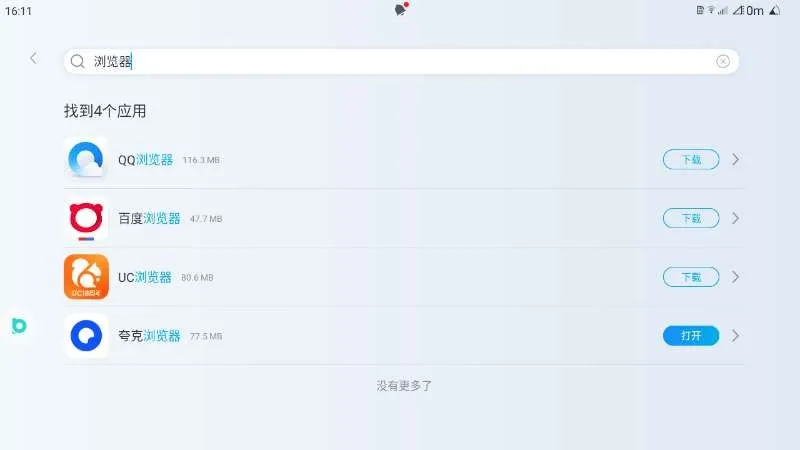
Image 1: Example of searching for a browser in a domestic-market in-vehicle app store, from Pudding UI’s 2024-08-15 Qin PLUS installation tutorial. It shows an entry point that was available at the time; it doesn’t mean you’ll still be able to find every browser shown in the image.原作者图文教程.
This tutorial also describes “install a browser from the app store → visit the publisher’s official website → download the APK.” This assumes the current browser allows downloads and the system allows installation. You can’t assume this method will also work on export versions or restricted firmware. When visiting an official website, check the domain directly, and avoid search ads and repackaged files on file-sharing sites.
Method 2: On domestic-market versions that allow installation, open the APK with the file manager
The official manual for the Yuan PLUS Glory Edition describes installing external apps as follows: download the app, allow unknown sources, open the file to install it, then launch it from the app list. The Tang DM-i Zhijia Edition manual uses the wording “allow installation of apps from external sources.”元 PLUS 手册,印刷页 202–203.
- Download an APKcompatible with the head unit’s Android version from the software publisher’s official website or release page. First make sure you haven’t downloaded a webpage, ZIP, XAPK or APKS file instead.
- Put the APK on a regular USB drive and plug it into the model’s data port. If you just want to open the APK using the file manager, you don’t need to copy the special folder names used on export versions.
- Open the in-vehicle file manager, go to the USB drive and find the APK. Follow the system prompts to enable permission for that installation source, then install it.
- Go back to the app list and open the app. Grant permissions based on the features you actually use. First check startup, display, audio and connectivity, then consider setting it as the default launcher or enabling auto-start.
Pudding UI’s 2024-08-06 Seagull tutorialIt also demonstrates three ways in: using a USB drive with a file manager, downloading through a browser, and using an existing in-car version of Sofa Butler. These are examples of how it worked at the time and don’t guarantee that all of these options are still available on newer firmware.海鸥原作者教程.
Installing an app and granting ADB permissions are two separate things. For example, DiPlay’s basic CarPlay functionality doesn’t require ADB; some automatic control or vehicle-status reading features have separate permission requirements. If the app can already be installed, don’t change the debugging settings just for ordinary use.DiPlay 安装与权限说明,中文安装指南.
Route 3: USB scanning and installation on export versions—region and model year matter
This route works by inserting a USB drive, having the system scan a specific folder, and bringing up the installer. It’s different from tapping an APK directly in the file manager as described above.
Xinger's Tech Lounge’s 2023-07-14 ATTO 3 videodemonstrates the older USB installation method, and a later note explicitly states that 13.1.32.2310… no longer applies. The 20211231,BYD6125F, andGHY0613byd shown in the video all reflect the versions available at the time. They are not universal passwords for every 2026 head unit.原视频及作者补充.
Another developer analysis of the installer on export-version DiLink 3 records directories with regional suffixes and different whitelist rules:
- Brazil:
Third Party Apps 55; the source records the local password as BYD6125F.
- Mexico / Indonesia / Thailand:
Third Party Apps 52/62/66; the spaces, folder names, and suffixes must match the system’s regional configuration.
- India:
Third Party Apps 91; the source records 130820, and also notes a package-name whitelist.
- Europe / Australia / Japan analysis branch:
Application Installation <region code>; cloud review applies, so changing the password alone won’t let you install anything you want.
Source:开发者安装指南,安装器地区分支分析. This analysis is based on the system packages examined by its author; itis not an official compatibility guarantee for every model or OTA in the markets mentioned above. Don’t guess the folder based on your location’s country calling code; a parallel-import vehicle may not use the configuration for the country it’s currently in.
For this route, prepare the folder and APK as described in the source, insert the USB drive into the data port, and check whether the installer appears. If there’s no pop-up, first check whether the USB drive is recognized in the file manager. If the files are accessible but installation isn’t allowed, that’s an installation-entry or review restriction; repeatedly reformatting the USB drive won’t help.
Route 4: Installing apps from a computer or Android phone on a head unit with ADB already enabled
Example of an entry point in an older domestic-market interface
Buding UI’s 2024-07-30 illustrated guide says that on some domestic-market interfaces, you can reach the debugging page by repeatedly tapping the words “Restore factory settings” on the Version Management page. It also describes opening the debugging switch through its app.wordsto open the debugging page; it also describes using its app to jump to the debugging switch.Don’t tap the “Restore” button on the right. The source doesn’t specify a universal number of taps for all models, or confirm that this still works after every subsequent OTA.原作者完整步骤.
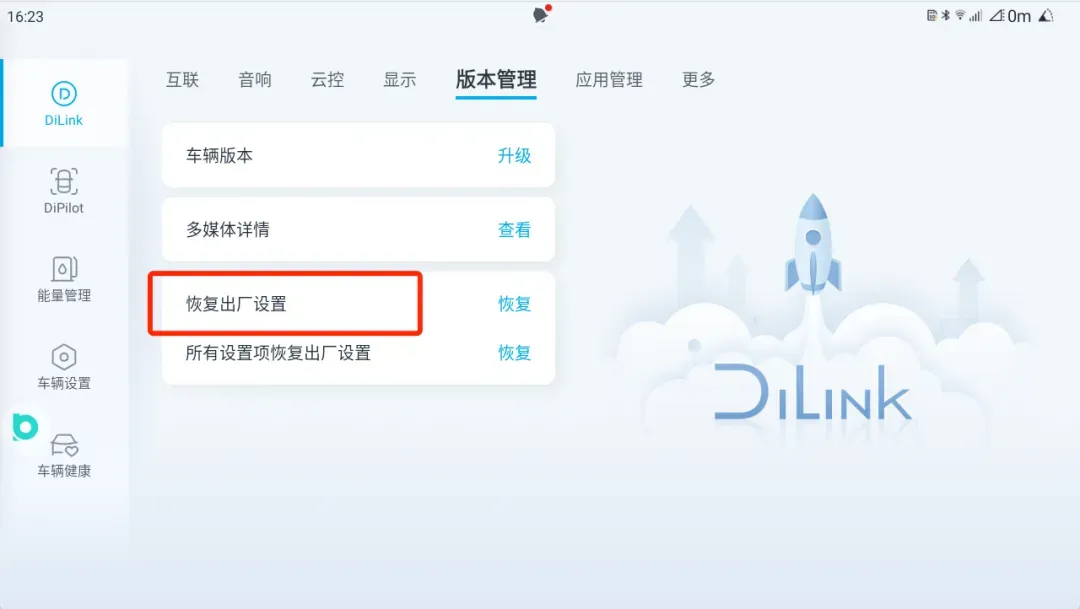
Figure 2: the text area outlined in red by the author. The image is from the 2024 tutorial; if your screen looks different, check your version first.
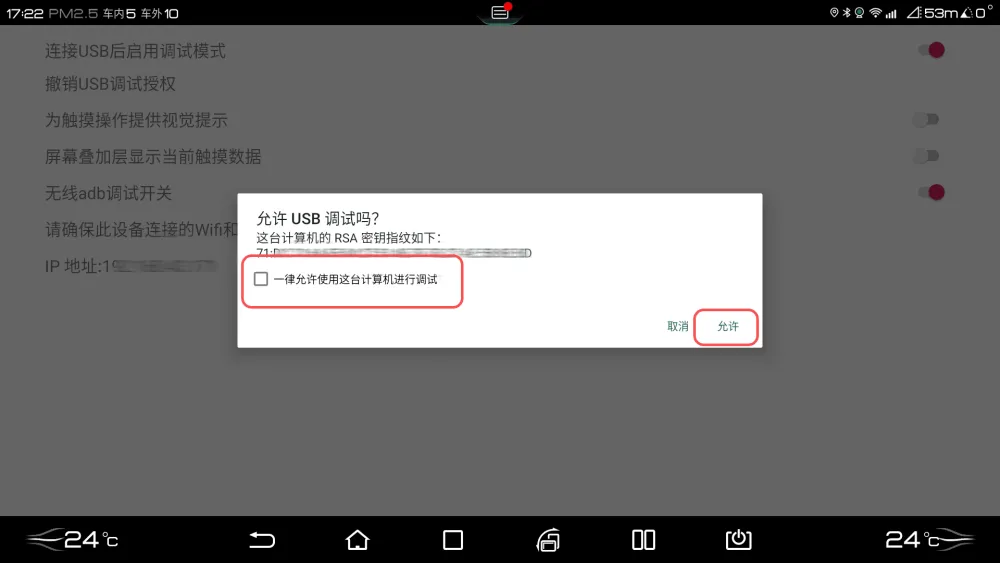
Following only the source, enable the USB and/or wireless ADB switch you need, and authorize your own device. Leave all other engineering options unchanged.
Figure 3: the USB/wireless ADB switches and authorization prompt from the same tutorial. The switch names and authorization flow are what to look for. The IP address and key in the image were obscured by the original author; they are not connection details you can copy directly.
Limits for newer interfaces and export versions
BAOLAB’s 2026-06-15 tutorial shows a branch where entering *#91532547#* in the Bluetooth dialer brings up a service QR code, with the debugging switch available later in the factory menu. The QR-code step is part of itsseparate third-party paid remote service— this is not an official free BYD tutorial, nor is it something you can complete with a regular WeChat QR scan. Seeing a QR code doesn’t mean ADB is enabled; whether it remains enabled after an OTA update or reset also varies by vehicle and software version.说明及适用条件—作者 YouTube 视频。
The 13.1.33 branch guide also involves downgrading, an IMEI-derived passcode, and modifying the installer. It applies only to certain firmware prefixes and involves flashing firmware. I’m keeping the original here for comparison, not combining it with installation steps for other head units. An IMEI-derived passcode also cannot replace the QR-code branch.13.1.33 原文。
Connect and install only after ADB is enabled
On your computer, get the tools from Android 官方 Platform Tools and extract them, then open a terminal in that folder. For USB, use a data-capable cable and the appropriate data port, and allow debugging for your computer on the head unit. Don’t treat “plugging in a USB drive” and “ADB from a computer” as the same operation.
adb devices
adb install "app.apk"
First, make sure the target head unit shows as devicebefore installing. If multiple devices are listed, select the target by its actual device ID.unauthorized means the head unit hasn’t authorized the connection yet. If the list is blank, check the data cable, port, drivers, and debugging switch first; these states are not APK compatibility issues.Android 官方 ADB 文档。
For wireless access, connect the computer or Android phone and the head unit to the same private Wi-Fi network or phone hotspot, then find thehead unit’s own IP addressin its network details. Use the specified port to connect only if that firmware supports traditional wireless ADB. Some BYD tutorials use 5555; don’t assume every Android pairing screen uses the same fixed 5555.
adb connect 车机实际IP:该固件的调试端口
adb devices
adb install "app.apk"
On an Android phone, you can use Bugjaeger from the original tutorial to connect to the head unit on the same local network, then send the APK from your phone after authorizing it on the head unit.13.1.33 指南的手机连接段落。When you’re done, turn off debugging or revoke any authorization you no longer need, using the method supported by that head unit.
If installation fails, first identify which step failed
- The head unit can’t see the USB drive at all: Check the data port, adapter, USB drive compatibility, and file system. See the accompanying illustrated guide.
- The APK is visible, but installation is blocked or the operation isn’t supported: Check the firmware, permission to install from this source, and regional restrictions. Changing the cable usually won’t help.
- Failed to parse the installation package: Check the minimum Android version, whether the downloaded file is complete, and that it really is an APK.
- Signature mismatch when installing over an existing app: Check whether the installed version came from a different publisher. Back up the app data before uninstalling.
- The app installs, but crashes, shows a black screen, or has no sound: Troubleshoot the app’s compatibility and operation separately. Successful installation doesn’t mean all its features work.
- The original entry point stops working after an OTA update: Keep the full new firmware version and the exact error message, then look up the relevant branch again. Don’t treat an old screenshot showing success as a guarantee.
For a current DiPlay example, see v0.2.13 安装要求and兼容说明。Use video entertainment and perform debugging operations only while parked;唐 DM-i 智驾版官方手册,323 页The guide explicitly restricts unofficial firmware flashing and Root access. I don’t recommend flashing mismatched firmware just to install a regular app.
Find the original author’s guide and video by model
For Chinese-language written guides, see 布丁 UI 的车型安装目录. It covers Tang DM-i/EV, Han DM-i/EV, Song PLUS EV, Yuan PLUS, Seagull, Destroyer 05, Qin PLUS, Seal, Qin L DM-i, e2, as well as Denza D9 and Fangchengbao Leopard 5. This directory is only an index for finding the tutorials available at the time; it doesn’t mean the instructions work across all old and new head units for these models.
- Bilibili | China-market APK installation example:布丁 UI:比亚迪安装教程,无需 ADB,2023-09-04。Useful for understanding the direct installation entry point on China-market head units at the time.
- Bilibili | China-market ADB example:布丁 UI:比亚迪车机如何开启 ADB 调试,2023-10-17。Check the menus against your own firmware; don’t copy these steps to the QR-code branch.
- YouTube | Older USB scanning method for export models:Xinger's Tech Lounge:The USB method,2023-07-14。Be sure to also read the author’s follow-up about it no longer working after 2310.
- YouTube | QR-code/ADB branch for the new UI:BAOLAB:How to Unlock ADB on BYD DiLink 5+,accompanying webpage published on 2026-06-15. It includes steps for a third-party paid service; see the caveats above.
I couldn’t verify matching Bilibili and YouTube versions from the same author with the same tutorial content this time, so the links listed aredifferent tutorials for different installation routes,not mirrored versions of the same video. Feel free to share links to the original author’s tutorial on both platforms.
When reporting an issue, you can copy and fill this in:Market | Model/year | Full firmware version | DiLink/UI | Android | Access method | Data port location | Exact error message。With this information, other owners can work out whether your method applies to their vehicle.